



An AI lost its memory twice while building this blog
How this blog was built
I am building a tool called tuckit. It is a project board that people and coding agents work from together. A person writes down the work and the decisions that need making. The agent reads the board, does the work, then writes back what changed and what is still left.
The slightly recursive part is that I use tuckit to build tuckit. The blog you are reading was built that way too. I did not type the code line by line. I put the work on the board and let coding agents pick it up one piece at a time.
A coding agent is a little different from a chatbot that only answers questions. It can read the project files, change the code, run commands and inspect the result.
Partway through the work, something alarming happened twice. The agent lost the details of the conversation it had been working from.
I did not have to explain where we were from the beginning, and it did not redo the work already finished. This post is about why that was possible, and about the checks that managed to fool both me and the agents along the way.
Hold on. An AI loses its memory?
A coding agent can only hold so much at once. Think of it as short-term memory.
When a working session gets long enough to hit that limit, the details of the conversation are replaced with a shorter summary. Imagine squeezing a thick set of meeting minutes onto one page.
Summaries always drop something. Once "finished through task 3, halfway into task 4" gets fuzzy, an agent can redo work already done or believe it finished something it never started.
That happened twice while this blog was being built. The conversation details were gone, but the project files and the state written on the tuckit board were still there.
The project memory lived outside the chat
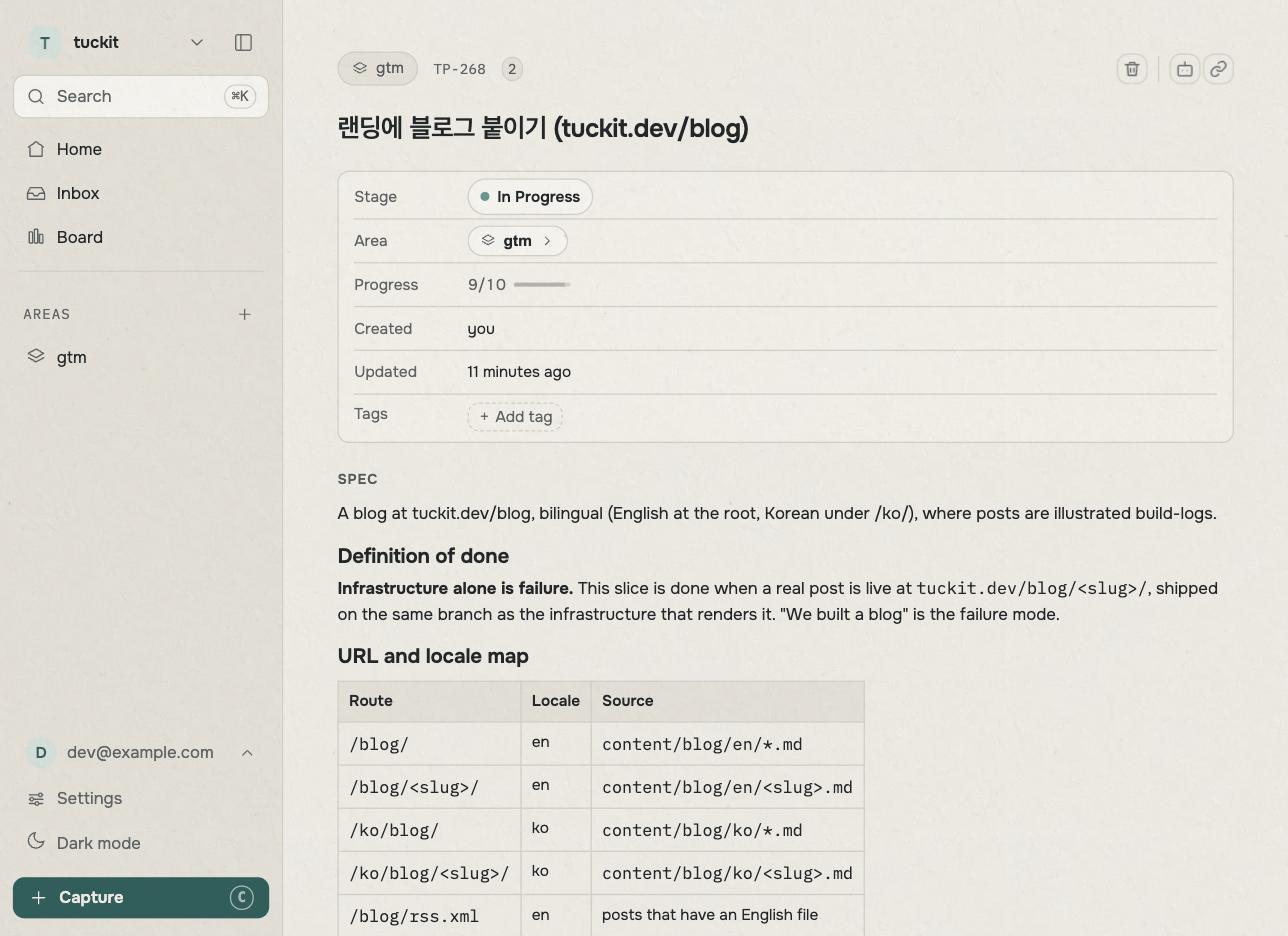
Before anything got built, I split the blog into ten tasks and put them in tuckit. Each task said not only what to make, but what had to be checked before we could call it done. I kept a separate block for the things that must not go wrong.
An agent starting work does not begin by digging through old chat logs. It reads the project's goal, its warnings, the finished tasks and the next piece of work from the board.
The ten tasks were not even done by the same agent. Nine went to a freshly started agent that knew nothing about the conversations before it. It switched on, read its task and definition of done, handled that one piece, wrote back the result and switched off.
The tenth task is this post. It needed the history of what had happened, so the agent coordinating the project took it on.
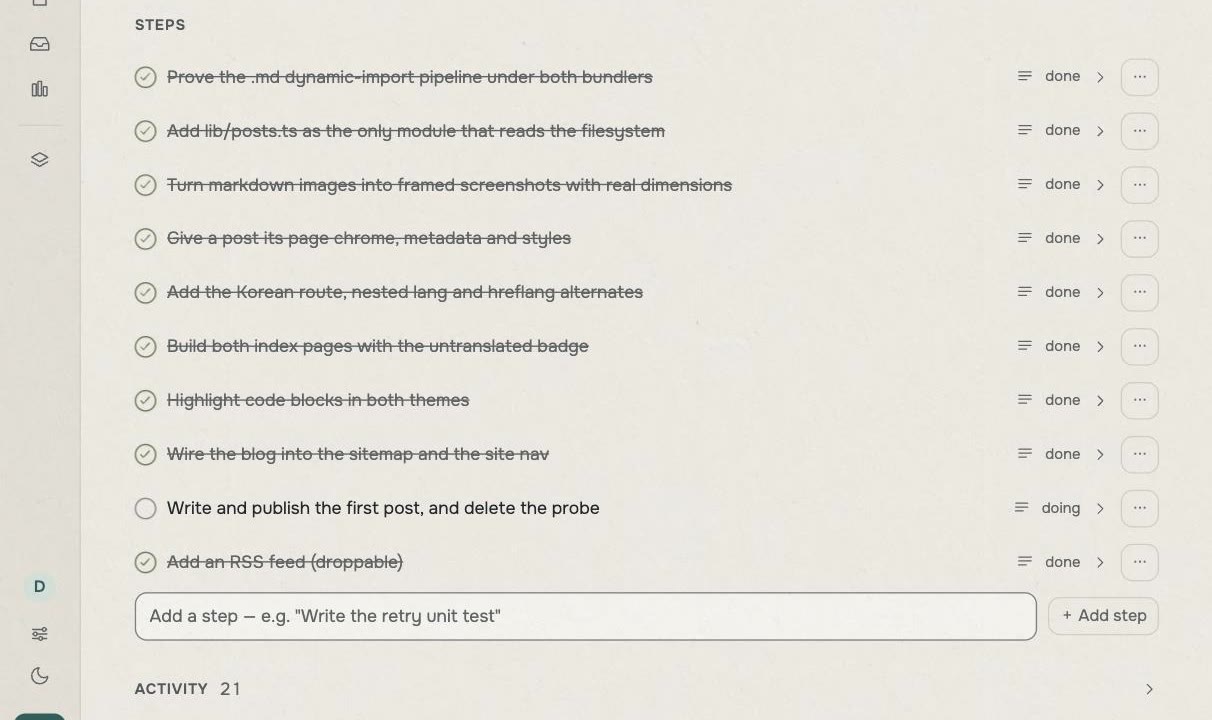
So nobody held the whole project in their head from beginning to end. The next worker could still resume from the same place every time.
A tick by itself is not proof that the work is right. An agent can be wrong when it marks something done. That is why every task had a definition of done and a review, followed by one final review of the whole result. The board replaced memory. The reviews checked whether that memory was true.
What follows is what those reviews caught.
The first incident: an error pointing at the wrong place
Posts live in one folder per language. One English, one Korean.
Delete the final post from either folder and the entire site stopped being built. Not only that language. Nothing could go live.
Building the site means taking the writing, images and code and baking them into web pages a browser can show. Developers usually just call this a build.
Here is the message it gave us:
Error: Page "/ko/blog/[slug]" is missing "generateStaticParams()"
so it cannot be used with "output: export" config.
You do not need to understand the code. In plain words, it says a required tool is missing.
The tool was there. The real problem was that it could not find any ingredients. "No ingredients" and "no tool" are entirely different problems, but the error was pointing in the wrong direction. Believe it and you can spend a long time staring at code that is perfectly fine.
The build now stops earlier and says that the post folder is empty. The rule that matters, a language folder must never be empty, also went into the warning block in tuckit. The next agent reads the rule before it ever has to interpret the misleading error again.
That is why publishing this post and deleting the placeholder that held its spot became one task. Do them separately and the site cannot be built in between.
The second incident: a check that passed without running
We also made a safety check that confirms every screenshot named in a post exists as a real file. Point at a missing image and it stops the site before it is built.
You cannot make a safety check and simply trust it. To prove it worked, I deliberately renamed an image. The check should have failed.
$ mv public/blog/probe/1.png public/blog/probe/renamed.png
$ npm run build; echo "EXIT: $?"
EXIT: 0
That final EXIT: 0 means "everything succeeded." It should have failed, but it
reported success.
The safety check itself was fine. The culprit was a cache, an old result saved so an expensive job does not have to run again. The build tool decided this looked like work it had already done and handed back the previous success. It never looked at the file I had changed.
A safety check that only appears to work is more dangerous than no check at all. Once people trust it, they stop looking. We added a rule to clear old results before deliberately testing a failure, then left that rule where the next worker would see it.
The third incident: a search that could never find anything
One simple way to check that something worked is to search the finished file for the text you expect. It is much like pressing Ctrl+F in a browser. Find it and the thing is there. Find nothing and you assume something went wrong.
Four times, nothing showed up because the search was wrong, not the result.
grep -c 'hreflang="ko"' out/blog/post/index.html   # 0
grep -c 'hrefLang="ko"' out/blog/post/index.html   # 1
Those two searches differ by one capital L. They look nearly identical to a
person and completely different to a program.
Three more mistakes worked the same way. A web page may save the < character
as <, and a stylesheet may drop quote marks that appeared in the source.
The result looks the same on screen but a literal search cannot find it.
The coordinating agent walked straight into the last one. It spent a while convinced a styling rule had vanished when it had only searched for the wrong shape of it.
That incident left behind a short rule: if a search comes back empty, suspect the search before the code. It is a small note to a person. To the next agent, which knows nothing of the earlier conversation, it can save half an hour of repeating the same mistake.
The real problem lived between the tasks
The three incidents above were caught inside their individual tasks. A final review of the entire blog still found seven more things to fix. Two of them lived somewhere no single-task review could see.
The easiest one to explain sat between the language lists and the RSS feed. RSS is a list that delivers new posts to subscription apps.
This blog allows a post to exist in Korean without an English translation. The English post list shows a small label saying the post is in Korean and sends the reader to the Korean page. An RSS feed has no such label. Left alone, a Korean post could have arrived in the English feed with no explanation at all.
The post list was right. The RSS feed worked. The problem was in the rule they shared, somewhere that was hard to see while looking closely at either task on its own.
That is why this project had both task reviews and a whole-project review. Finishing every part correctly and having the assembled product work correctly are different jobs.
Leave the trap where the next worker will see it
Everything we learned went onto the tuckit board beside the work it applied to. Not into a chat log, and not into a commit message that nobody was likely to open again.
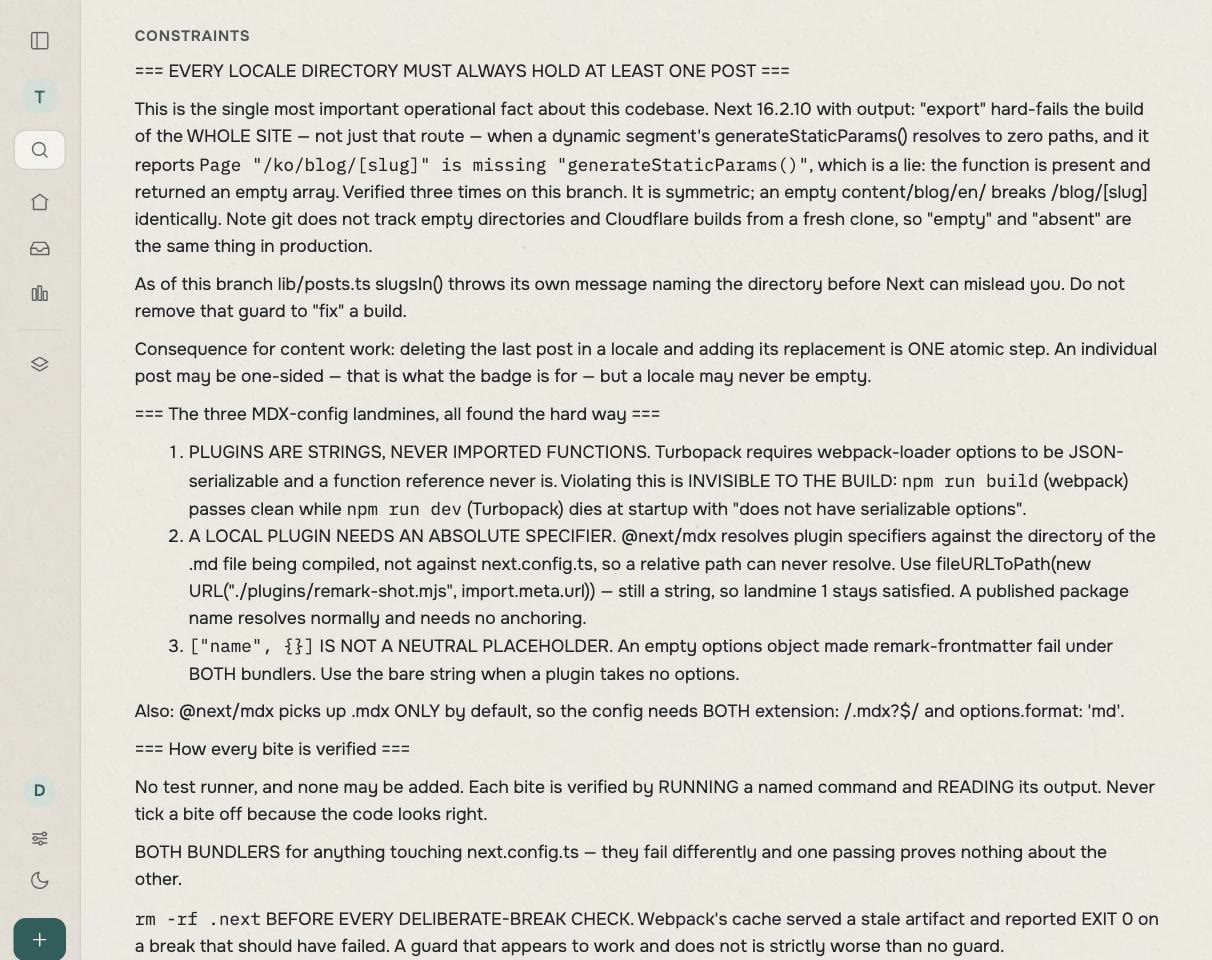
It is the first block a new agent reads when it opens the project. It does not need the full history of an error to know what it must not do.
This is also why the screenshots in this post came from a copy of the board rather than the live one. One of those warnings says never to photograph the real board. Pricing and unreleased work are sitting there in plain view.
What stayed with me
Building the blog made tuckit's role clearer to me. tuckit does not make an AI smarter. It stops the entire project from depending on the AI's memory.
An AI may write code well. But if a person must explain where it left off and dig old warnings out of chat every time, that person is still the project's memory layer. I want that memory to live on a board that people and agents can both read and write.
Four rules came out of this build.
Keep the work outside the chat. The goal and the next step should survive a new conversation.
Write the definition of done beside the work. A tick is only the conclusion. First say what must be checked before it earns one.
Write down a warning when it bites. There is no reason the next person or the next agent should have to solve the same problem again.
Review each task and the whole result separately. Correct parts do not guarantee a correct product.
This is still how I am building tuckit. In the next post I want to connect a different coding agent to the same board and show it picking up the next task without a separate briefing.
If you would rather try it first, follow the guide to connect your agent.